
Guide · sources checked 2026-09-30
Grok Bot
Give a named Bot an ongoing job, such as gathering information and preparing a weekly update.
Official website · Explore agents

Grok Bot at a glance
xAI documentation identity mark · official source · checked September 30, 2026
Illustrated explanations by PersonalAgents, based on the linked documentation.
Two roles, one shared computer
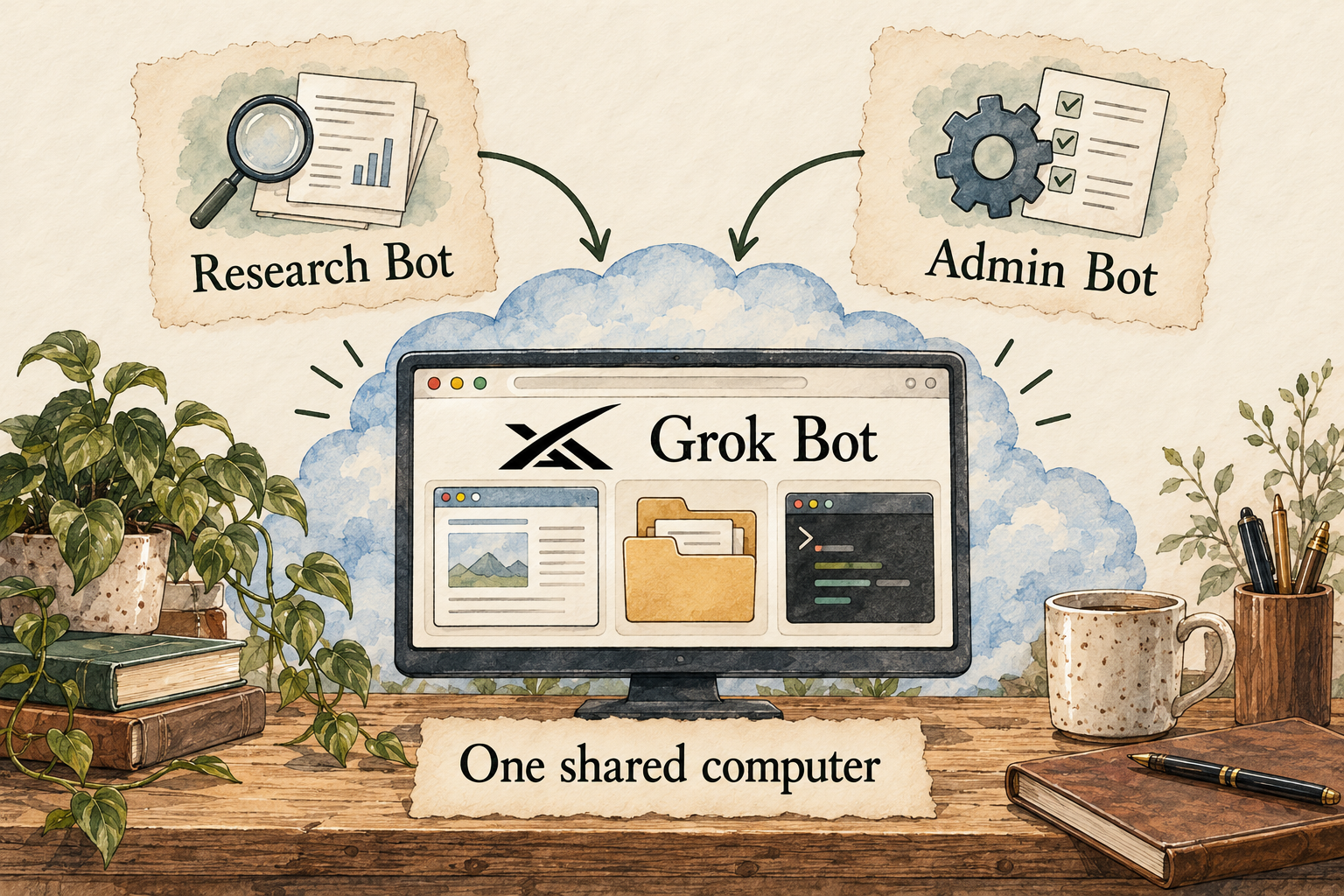
Image description
- Describe one job and what a useful result looks like.
- Your Bots share an account-level cloud computer, including files and logins.
- Choose connected apps and configure ask-first rules.
- Check the output and correct mistakes before relying on it.
Your control point: All of your Bots share account files and logins. Ask-first rules govern actions; they do not make every action safe.
Identity marks and vendor images belong to their respective owners. Images load from the linked official publishers and may change or become unavailable.
A practical guide to Grok Bot
Grok Bot is most useful to evaluate against one real job: can it gather the right evidence, produce a checkable result and stop at the boundary you set? This guide explains its operating model, shows a suggested public-information trial and answers the twelve practical questions to ask before giving it broader access.
Last checked 2026-09-30. Links to the original documentation appear throughout this guide.
What Grok Bot adds beyond a chat answer
Grok Bot is an app for named, persistent Bots with assigned responsibilities. They can use a cloud browser, files, a terminal and supported connectors, rather than only returning conversational answers. The documentation says work can continue when your laptop is closed. This article covers that agent app, not an assumption that every ordinary Grok chat has the same access.
The useful distinction is the deliverable. If you need an explanation of a term, a conversational answer may be enough. If you need a report assembled from several sources and saved for later review, an agent workflow has a clearer purpose. You still need to decide which sources count, what the report should contain and which changes the agent may make. A confident response is not proof that it opened every source or finished every step.
Bots on one account use a shared computer. Their screens can be separate while files, browser sessions and command-line credentials remain available across the account. The computer guide describes Agent Computer as the place to watch activity or take over a blocked step. Separate screens do not create separate access boundaries.
Treat the account as the working environment you are lending the agent. A Research Bot and an Admin Bot can be useful role labels, but those names should not persuade you to mix two projects that require different confidentiality. Start with a single job whose inputs you are comfortable placing in that environment.
A first task you can judge for yourself
Our suggested trial is a comparison of three public pages about one topic you already understand. Choose pages with concrete differences: three event venues, three public software plans or three course descriptions. Avoid sign-in pages, private records and purchases. Your familiarity with the topic helps you catch omissions instead of relying on the agent to judge its own work.
Give your Bot this original example request: Compare these three URLs for me. Return a table with the page name, the relevant feature, any stated limitation and a direct source link. Add a short recommendation based only on the criteria I give you. Mark information you cannot find as not stated. Do not register, contact anyone, purchase anything or change a website. Stop after returning the draft.
The files guide supports links and attachments as inputs, with reviewable output files shown in conversation cards. It recommends specifying an artifact and acceptance criteria. Desktop uploads allow six attachments at once, with documented size limits of 25 MB for documents, images and audio and 200 MB for video; unsupported or damaged files may fail to read.
Review the comparison row by row. Open each original page, check that the claimed feature actually appears, and distinguish a missing detail from a negative answer. Ask which page or section supports any surprising conclusion. If one source cannot be opened, request a partial report that clearly identifies the gap. Keep the corrected output: it becomes your reference for judging a second run, not a claim that the product is universally reliable.
A Bot, a skill and a routine have different jobs
A Bot owns the responsibility; a skill holds reusable instructions; a routine starts work on a schedule or supported event. Saved skills can be used across Bots. The routine guide also distinguishes Slack or GitHub event integrations from ordinary connectors and notes that availability can depend on rollout. Teaching a browser task, where available, produces a draft skill to review.
For the comparison example, a skill could specify which columns to include, how to label missing facts and when to stop. A routine could ask the same Bot to check those pages each Monday. Keeping the method separate from the schedule makes a change easier to reason about: fixing the report format should not accidentally change how often the work runs.
Before scheduling, choose a time zone, define the input list and decide what should happen when a page fails. For example, require a message saying which source was unavailable rather than a report that silently reuses an older result. Try a second input set first. One neat output tells you little about handling missing prices, contradictory pages or a website that changed its layout.
The vendor examples include research lists, expense summaries and account-health reviews, generally starting with prepared outputs rather than immediate external changes. They describe turning a reviewed one-off process into repeatable work. These examples demonstrate intended use, not measured success rates.
When a second Bot helps—and when it adds work
The collaboration guide describes group conversations with two to six Bots and direct Bot-to-Bot handoffs. A group can make ownership and review visible. The conversation also shows tool activity, files, questions and approval requests. An editable email or message draft can be reviewed or discarded before sending.
Messages and Bot collaboration
A practical two-role example is one Bot gathering evidence and another checking the resulting report. Give the reviewer a specific job: identify unsupported claims, missing sources and contradictions. Do not simply ask it to say whether the report looks good. Keep one owner for the final result so two Bots do not each revise different copies or start duplicate research.
A second Bot is optional. If a single Bot can collect the sources and you can review them quickly, a larger roster may create more messages than value. Add a role only when you can explain what it owns, what it receives and what it returns. A specialist name is an organizing choice, not an independent professional qualification.
Understand the meter before repeating the work
Cursor currently lists its entry paid individual plan at US$20 per month before applicable taxes, with Grok Bot access. That subscription price is not a price per completed task or a promise of unlimited agent work. Teams and Enterprise have different pricing and administration.
The billing guide describes weekly included usage and optional extra usage billed through Cursor. Linking a supported Grok or X subscription does not stack its allowance with an existing eligible Cursor plan. An on-demand monthly limit can be exceeded by a job already running; it stops further on-demand work after that job finishes.
Record the usage screen before and after your trial and note whether you had to repeat work. A cheap-looking first draft may require several corrections, and a recurring task multiplies that pattern. Compare the time saved by the final usable result with the time spent supervising it. We have not measured a cost per report, so there is no defensible number to supply for that here.
For a first evaluation, leave extra spending off if you do not want usage to continue beyond the included grant. Check your actual account settings rather than assuming a default. Before a recurring job, decide how large its input list may grow and who will notice repeated failures. A schedule is a cost decision as well as a convenience.
Who should try it, and who should wait
Consider a small trial if you have a recurring research or preparation job, can identify trustworthy inputs, and are willing to review a result. The strongest starting task has an obvious finish line: a source-linked comparison, an annotated draft or a reconciled list of items for your attention. Those outputs give you something concrete to inspect.
Wait if your main requirement is that all information stays on your device, if the task needs permissions you cannot authorize, or if you cannot check its mistakes. For regulated, financial or other consequential decisions, the agent may help organize inputs but its output does not replace the appropriate expert or your normal verification. There is also little benefit in setting up a roster for a question you only need answered once.
The decision is not whether the agent can produce an impressive demonstration. It is whether the specific job remains useful after you include setup, permissions, review, corrections and ongoing cost. Keep a short trial record containing the request, sources, final output, mistakes you found and your own decision about continuing. That is more informative than a broad rating without first-hand evidence.
Answers to all 12 questions
Each answer explains what the official sources say and what that means in practice. “Evidence gap” means a detail we could not confirm; it does not automatically mean a feature is missing.
- Can I use it on my device and plan?
- What can it help me do?
- When does it ask my permission?
- How do I stop it or recover from a mistake?
- What does it remember?
- Can I change or delete its memory?
- Which apps can I connect?
- Where does my information go?
- Where does the agent run?
- What privacy controls do I have?
- What will it cost?
- How do I get started and find help?
1. Can I use it on my device and plan?
The official overview lists macOS, Windows, Linux, iOS and Android. Desktop and mobile reach the same named Bots. Device support does not establish every regional, language or account eligibility condition.
The current billing matrix includes paid individual Cursor plans, Cursor Teams, and supported individual SuperGrok or X Premium+ account links. Enterprise access is managed separately. Check the plan screen before buying; two active subscriptions do not create two combined allowances.
Begin with the account you intend to keep using. A work account and a personal account may have different administrative controls. If you already subscribe to a listed service, confirm your access there before purchasing another plan.
2. What can it help me do?
The vendor describes multi-step browser and file work, connectors, terminal operations and cooperation between Bots. Its use-case guide includes preparation of research, reporting and draft communications, rather than a guarantee that every website or workflow is supported.
Grok Bot overview · Grok Bot use cases
Choose tasks with observable evidence. For a venue comparison, define capacity, accessibility and cancellation terms as separate questions. For a change report, require the old and new claim plus a source. A recommendation without those details is hard to audit. If you need a simple answer with no tool access, the agent setup may be unnecessary.
3. When does it ask my permission?
Choose access and keep control
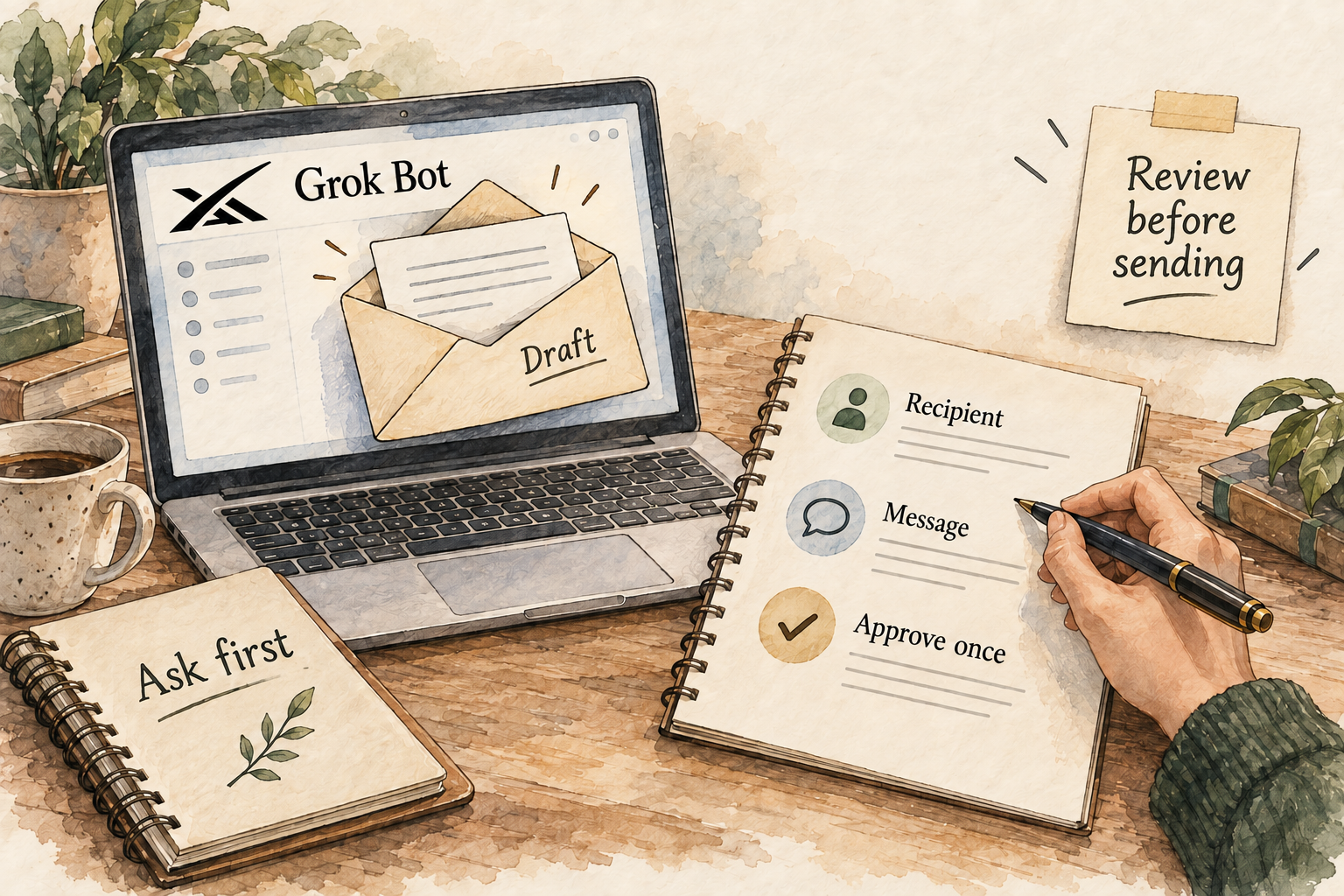
Image description
- Connect only the apps and information needed for the job.
- Set consequential actions to ask first, and check the rules actually in use.
- Inspect the draft and its sources before allowing further work.
Auto Review has ask-first and automatic-allow rules; ask-first wins when both match. Action requests can be allowed once, denied, or used to save a matching allowance. The review is model-based, so it is not a guarantee that every harmful action is prevented.
Approvals, security and privacy
Set the boundary around an effect: prepare an email but stop before sending, or prepare a report but stop before publishing. Check the exact recipient, file or target system and the proposed change. If an approval is vague, ask for a plain explanation first. A broad permanent allowance is a larger decision than accepting one draft.
The collaboration guide describes editable message drafts and explicit send or discard controls. Review both the destination and the content; a good draft can still be addressed to the wrong person.
4. How do I stop it or recover from a mistake?
The troubleshooting guide says to inspect status, approvals or login requests, redirect the Bot, or send Stop now. For an unreachable cloud computer, recovery or update comes before reset. Reset may discard recent unsaved state. Closing the app is not a reliable way to stop cloud work.
Troubleshooting and computer recovery
Before retrying, ask what already happened. A report-generation failure is different from a message that was sent just before an error. For the former, request the unfinished sections; for the latter, inspect the destination before allowing another send. Preserve the partial output and relevant activity so you can distinguish a missing result from a repeated external effect.
5. What does it remember?
Separate Bot context, shared files
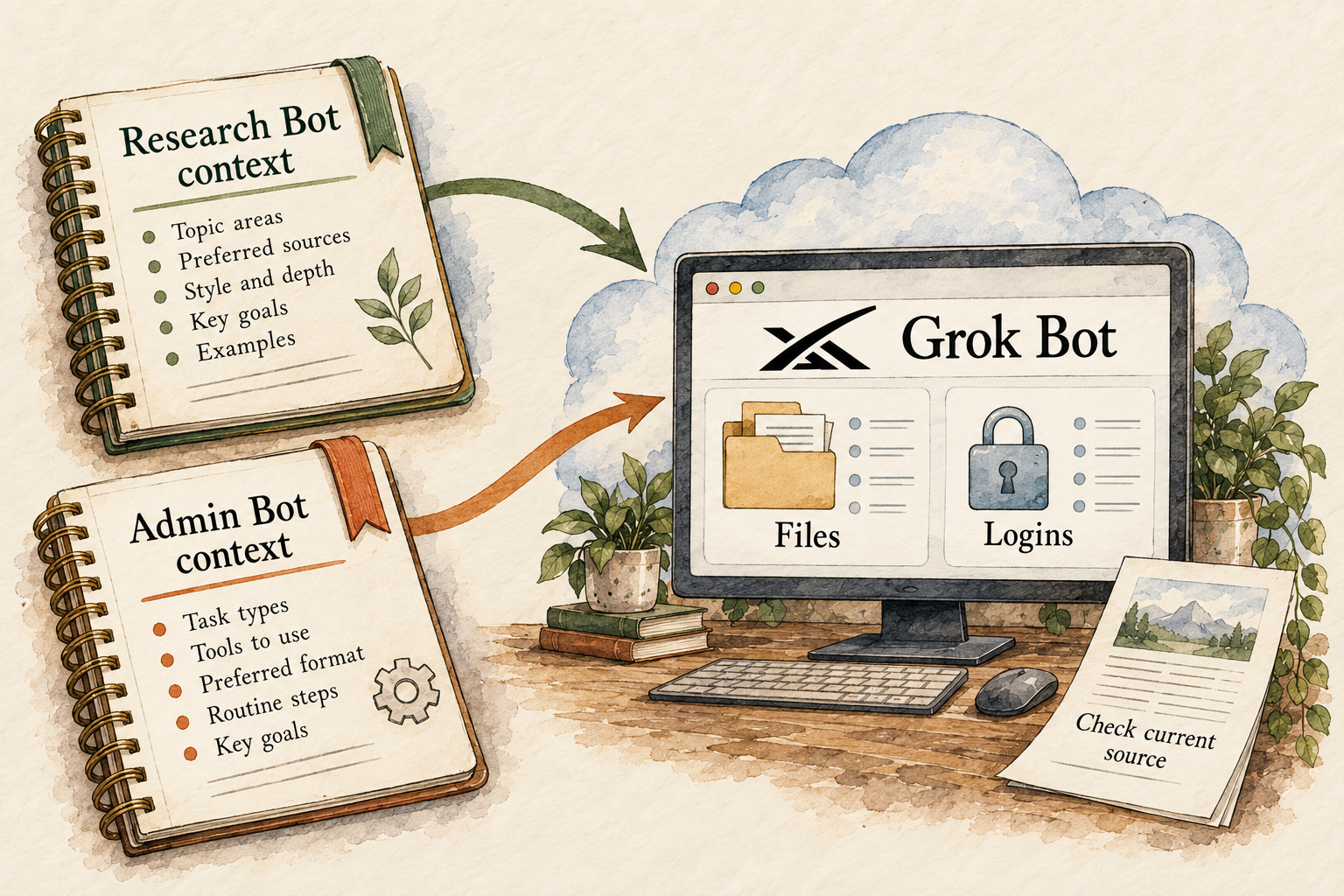
Image description
- Each Bot keeps its own conversation and learned context.
- Account-level files, browser sessions and logins are shared between your Bots.
- For important decisions, ask the Bot to check the current source rather than rely on an old memory.
The Bot guide describes stable preferences, role context and summaries that can persist. Conversations and learned context are separate per Bot; shared files can still carry information between them. It advises using current sources for changing facts.
A report format is a useful lasting preference: include source links, separate uncertainty and end with decisions needed. A venue price is a changing fact and should be checked again. In a trial, teach a harmless formatting preference, return with a new input and inspect whether the result follows it. Remembering something once would not establish dependable long-term recall.
6. Can I change or delete its memory?
You can revise a Bot description for standing responsibilities and correct assumptions in conversation. Duplicating a Bot copies configuration but not its conversation history or learned memory. Hiding a Bot removes it from the sidebar without pausing its routines.
What we could not confirm: The reviewed Bot guide does not establish a comprehensive granular memory editor or memory export for personal Bots. We cannot promise those controls from this evidence.
Keep a brief written list of the preferences you want it to use. If an assumption becomes stale, name the old assumption and its replacement explicitly. Check a fresh output after correction. If complete deletion or export of remembered information is essential to your use, establish the account-level process before uploading that information.
7. Which apps can I connect?
The computer guide describes Marketplace plugins as connectors, with authentication where required. In the composer, @ can reference a connector and / can reference a saved skill. A persistent browser login provides another route to a service; connector installation is account-wide.
Check your exact app and the operations you need, not just whether its logo appears in a marketplace. Reading a calendar is different from changing a meeting. Ask for the smallest supported scope and verify it on the source service. If you use a browser instead, inspect which account is signed in and whether the page is the right project.
Event-triggered routines have a separate integration setup from ordinary plugins. A working Slack connector alone does not establish that your account can run a routine on every Slack event.
8. Where does my information go?
Grok Bot requires cloud storage, and the privacy guide does not support Legacy Privacy Mode for this app. A permission to execute on your local computer is separate from where the agent service stores or processes its work.
Approvals, security and privacy
Installing a desktop app does not by itself meet a local-only requirement. Decide whether your trial inputs are acceptable for a cloud service before attaching them. Use public material for the first exercise. If your organization requires information to remain on a managed device, obtain its approved tool guidance rather than interpreting local execution as an offline mode.
9. Where does the agent run?
The standard working environment is the account-level cloud computer. The privacy guide also documents local-computer execution choices, with asking each time as the default and possible stricter administrator limits. These settings do not remove the cloud computer.
Approvals, security and privacy
For the public-page comparison, there is no reason to grant access to your own files. Leave that capability unavailable unless the job specifically needs it. If later work requires a local folder, define which folder and why before allowing access. Treat a request covering all Bots as an account-wide choice rather than a one-role exception.
10. What privacy controls do I have?
The privacy guide directs account storage and training choices to Cursor settings. Removing a Bot does not remove shared files or website sessions. Cleanup includes pausing routines, signing out, revoking connectors and removing working files; account retention follows applicable terms.
Approvals, security and privacy
Make cleanup match the access you actually granted. Signing out of a website and revoking a connector are different actions. Save any output you intend to keep, then remove unnecessary working material. Do not treat disappearance from the sidebar as evidence that stored data has been erased. For confidential work, review the contractual terms and your organization’s requirements before connecting it.
11. What will it cost?
US$20 per month is the currently listed entry Cursor individual subscription price before tax. Higher individual tiers and team plans have their own allowances. It is an access route, not a measured all-in price for your proposed agent workflow.
Estimate a personal budget from actual trial usage, not a guessed number of tasks per subscription. Include repeated runs and your own review time. Start with three pages instead of thirty; increase scope only when the output is useful. If extra spending is enabled, monitor it separately from the subscription and remember that an in-progress job may finish beyond the limit.
12. How do I get started and find help?
The setup guide walks through downloading the appropriate desktop build, signing in through Cursor, and creating a named Bot with one job and a description. It distinguishes standing instructions in the role from the concrete request for the current task.
For this trial, call the role Comparison Researcher and describe it as preparing source-linked comparisons for your review. State that it should not buy, send, register or publish. Then provide the three URLs and your criteria in the task message. If the result is too broad, narrow the criteria rather than adding more Bots. Save a repeatable method only after you have corrected and checked it.
Things to check
- Real-world accuracy, time saved, usage per task and failure rates have not been measured in our own hands-on evaluation.
- We have not confirmed every region, language, connector or rollout-specific feature for every account.
- Granular personal-Bot memory export/editing and exact account-retention requirements need account-specific confirmation.
Try it yourself
These are suggested tasks to try, not tests we’ve run. Compare each result with the original information before relying on it.
- Run the three-public-page comparison and retain the request, source pages, final report and corrections. This suggested exercise has not been performed.
- Check a harmless remembered formatting preference in a later conversation, then correct it and inspect a new output.
- In an isolated test account, verify a draft stops before a harmless external action and inspect which rule applied.
- If considering a routine, try a second input set and an unavailable source; observe notifications and meter changes before scheduling recurring work.
Sources reviewed
- Grok Bot overview · checked 2026-09-30
- Approvals, security and privacy · checked 2026-09-30
- Create and manage Bots · checked 2026-09-30
- Skills and routines · checked 2026-09-30
- Troubleshooting and computer recovery · checked 2026-09-30
- Grok Bot plans and billing · checked 2026-09-30
- Cursor monthly pricing · checked 2026-09-30
- Grok Bot setup · checked 2026-09-30
- Grok Bot use cases · checked 2026-09-30
- Files and reviewable results · checked 2026-09-30
- Cloud computer and app access · checked 2026-09-30
- Messages and Bot collaboration · checked 2026-09-30
Research describes documentation available on the check date. Features, prices and access can change. No test result or personal endorsement is implied.